Your staffing back office, automated. Every number checked.
Timesheets, invoicing, payments, receivables and payroll figures in one place. Vantusk checks every hour against the source document and prepares each QuickBooks invoice for your one-click approval.
consultants billed through Vantusk at ITG
timesheet formats: PDF, Excel, Word, photo, email
of billed hours traced back to the document they came from
invoices created without a person's approval
The month-end problem
Billing shouldn't take two weeks.
Every staffing firm knows the routine. Timesheets arrive in a dozen formats, someone retypes them, and the invoice goes out late, or wrong.
"Has everyone sent their timesheet?"
Chasing the inbox
Hours arrive as PDFs, spreadsheets, phone photos and one-line emails.
"Let me type these into QuickBooks."
Retyping by hand
Every manual entry is a chance to bill the wrong hours or the wrong rate.
"This week runs into the next month."
Weeks that split
A week across two months has to be split correctly, every time.
"The client found a mistake."
Errors found late
The most expensive mistake is the one your client finds first.
How it works
Three steps are ours.
One click is yours.
Consultants keep sending timesheets the way they always have. Vantusk does the work in between and stops at one clear point: your approval.
A timesheet arrives
By email, as consultants send them today, or uploaded on the dashboard.
Hours are read
Any format. The document is filed to the consultant's folder.
Every number is checked
Against the document's own totals and dates, with your billing rules applied. Anything uncertain is held.
You approve. It bills.
One click creates the QuickBooks invoice, with the timesheet attached as proof.
Inside Vantusk
Know what's ready.
Know what needs you.
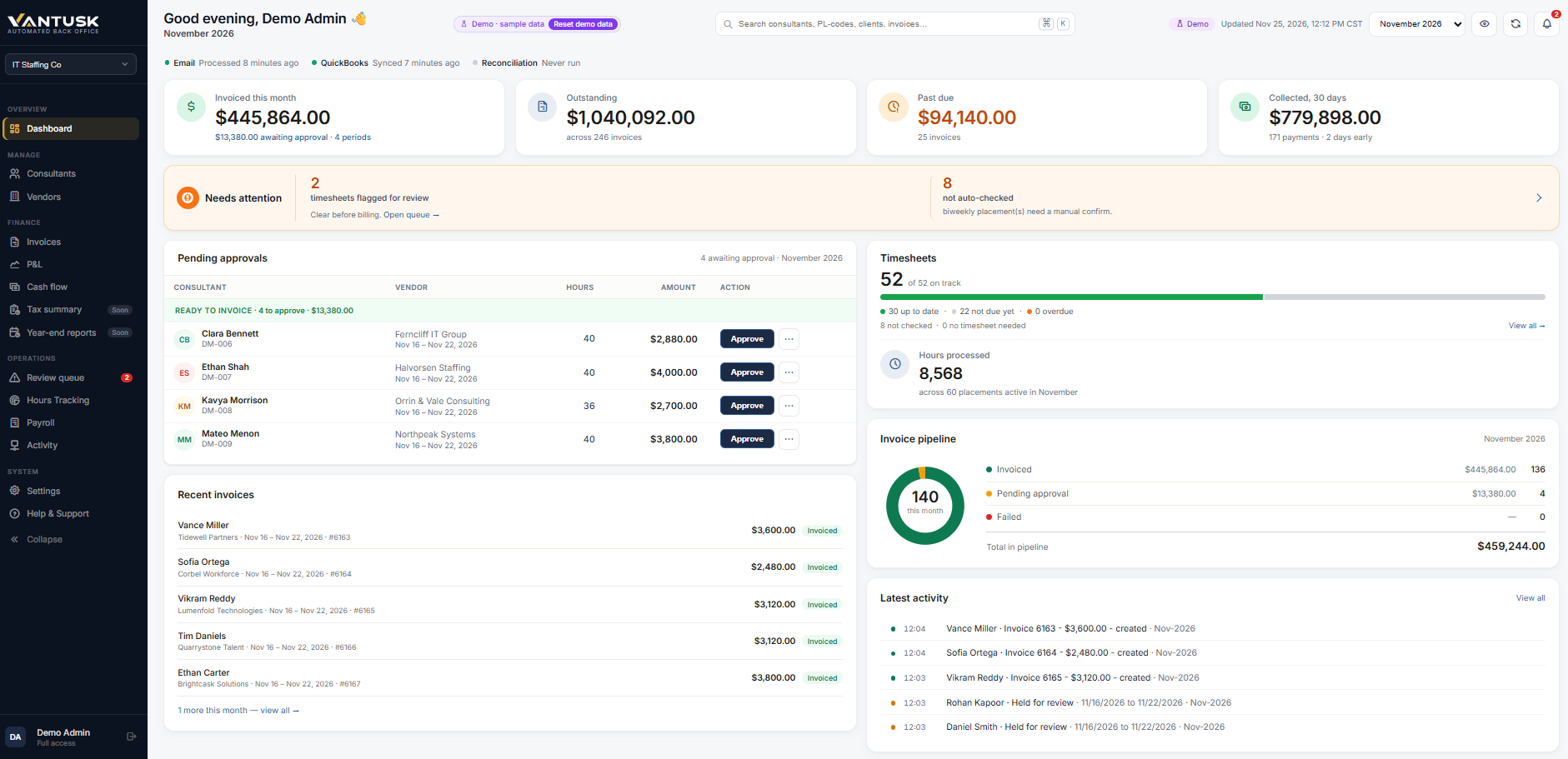
At month end you don't open forty emails. You open one screen, see what's ready and what's held, and approve.
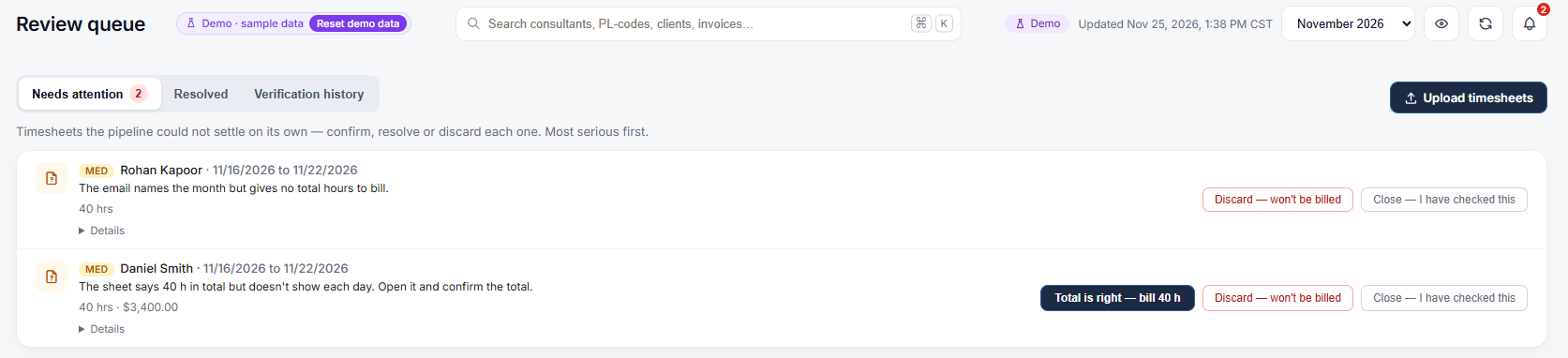
Held, with the reason
When something doesn't add up, the timesheet waits in the Review queue and says exactly what to check, with one click to settle it.
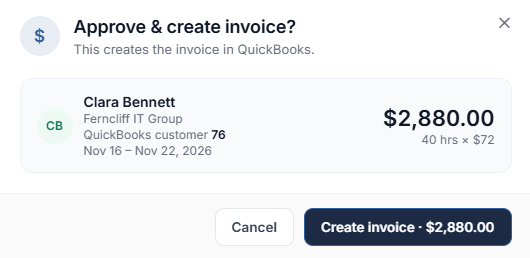
Approved, with the numbers
Before you click, you see the hours, the rate, the amount, the client and the QuickBooks customer. One click creates the invoice.
One back office
Everything after the timesheet.
Invoicing is where it starts. The same records then keep your payments, receivables, payroll figures and margins up to date.
Timesheets
Read from any format, checked against the document, filed to the consultant's folder.
Invoicing
Prepared by each client's billing rules and created in your QuickBooks once you approve.
Payments & receivables
What's been paid, what's outstanding, what's past due, by client and by invoice.
Payroll figures
What each consultant is owed for the period, from your pay rates. Your firm makes the payments.
Cash flow & P&L
Money in and out, and the margin on every consultant.
Tax & year-end reportsComing soon
Tax summaries and year-end reports from the same records.
What it handles
Built for how staffing actually bills.
Not a generic document reader. Vantusk was built inside a working staffing firm, one real edge case at a time.
Every format
Client portals, Excel grids, Word documents, phone photos, and hours typed in an email.
Boundary weeks
A week that crosses month-end is split to the right invoice.
Custom periods
Weekly, biweekly, monthly, or the client's own cycle.
VMS deductions
Vendor-management fees taken off automatically, per client.
Multiple placements
One consultant on two projects is billed to each correctly.
Manager sign-off
The client's approval is attached to the invoice. If it's missing, the period waits.
Your calendar
Your time zone and your holidays, not the server's.
Never billed twice
The same timesheet sent twice is recognised and ignored.
The details matter
Month-end doesn't wait for Sunday.
September 2026 starts on a Tuesday and ends on a Wednesday. The first and last weeks each belong to two months. Vantusk bills September only for September's days, and each week links back to the timesheet it came from.
Aug 31 → August invoice · Sep 1–6 → September invoice
Sep 28–30 → September invoice · Oct 1–4 → October invoice
Never guesses
When the numbers don't reconcile, Vantusk refuses to bill.
A wrong invoice costs more than a late one. Every figure is checked against its source document before it reaches your books.
- Anything it can't prove is held, with the reason shown
- A person approves every invoice
- Every correction is recorded: who, when, and why
The timesheet's printed total doesn't match its own daily hours. Nothing was billed. Check the document and correct the days, or ask the consultant.
Sample data.
Where your data lives
Plain about what we keep.
Your files and invoices stay in your own systems. Vantusk keeps only the records it needs to run billing, in a database that isn't reachable from the public internet.
Questions
Straight answers.
Does Vantusk send invoices to our clients?
No. It creates the invoice in your QuickBooks. You send it the way you do today, by QuickBooks email or through the client's vendor portal, and Vantusk tracks whether it was sent and paid.
What if the AI misreads a timesheet?
The AI only reads; it never decides what to bill. Vantusk checks what it read against the sheet's own printed totals, and a sheet with no printed total is read twice and the two readings compared. Anything that doesn't add up waits for a person, with the reason.
Can anything be invoiced without us seeing it?
No. No invoice is created without a person approving it, and approval is refused while anything in that period is still waiting for review.
Do we need Microsoft 365?
No. You can upload timesheets on the dashboard today. Reading timesheets straight from your Microsoft 365 mailbox is being switched on. On Google Workspace, email forwarding is set up with you during setup.
Is our data used to train AI?
No. Neither Vantusk nor the services that read documents use your data to train AI models.
How long does setup take?
Most firms are set up in about two working days. Your first invoices go out on your next billing cycle.
What does it cost?
Priced per active consultant per month. We share pricing after a short welcome call, once we've seen how you bill.
Who uses it today?
Vantusk is live in production at ITG Technologies, an IT staffing firm.
Contact
Talk to us.
A question about your billing, a partnership, or just want to see if Vantusk fits? Write to us. We reply within one working day.
See it with your own work
See your own timesheets run through it.
Send us a few real timesheets. We'll show you the invoices Vantusk would have prepared.